
Find the work worth improving
CSLM AI TransformationRequest a review
All pages
Explore
HomeFree AI workflow reviewServicesWorkflow atlasImplementation guidesIndustry guidesFree toolsFree AI consultant agent kitFree voice assistant pilotInsightsAI NewsAboutPrivacyServices
All servicesAI consulting for small businessesPrivate AI server setup for medium businessesSoftware consolidation for small businessAI workflow automation for small businessCRM integration for growing teamsAI-assisted lead intake and routingAI dispatch call automation and intelligent routingAI Data Entry Automation for Small Business: Documents to CRMTools
25-workflow small-business AI atlasWorkflow, prompt & SOP builderSmall-business AI prompt generatorSmall-business AI SOP generatorSmall-business automation cost plannerSynthetic workflow test packPrint & sign quote-intake demoFree AI workflow toolkit12-agent AI consultant starter kitFree CSLM voice assistantPlaywright UI testing agentWatch a Playwright checkout testAll insights
Browse the complete libraryEvery AI Output Needs an Expiration DateYour AI Project Should Be Designed to Fail SmallA Voice AI Agent Should Confirm Before It CommitsThree Major AI Systems Went Down Together. Your Workflow Still Needs to Work.An AI Policy That Lives in a PDF Is Not a ControlAn AI Dashboard Is Not a Business ResultEvery AI Agent Needs a Budget, Not Just a PromptAI Is Not Replacing Hackers. It Is Compressing Their Timeline.If Your AI Workflow Has No Exception Lane, It Is Not ReadyHow Much Does It Cost to Run Your Own AI Server? A Practical Guide for Medium BusinessesAI Transformation for Small Business: A Practical 90-Day RoadmapBest Free AI Tools for Small Business in 2026: Uses, Limits, and RisksAI Workflow Automation for Small Business: What to Automate First20 Practical AI Automation Examples for Small BusinessHow to Connect Small-Business Software and Stop Duplicate Data Entry5 Repetitive Small-Business Tasks to Automate FirstWhen spreadsheets become an operations bottleneckHow Small Businesses Can Use AI Without Exposing Sensitive DataSmall-Business Automation Opportunities: A Practical 12-Point ChecklistAI Workflow for Small Business: A 7-Step Starter PlanFree AI Data Entry Tools for Small Business: 7 Safe Ways to Test ThemFree AI Tools for Business: 13 Hidden Risks to CheckAI Consulting Cost for Small Business: What Changes the PriceAI Automation Before and After: 10 Small-Business Productivity Examples12 AI Sales Automation Examples for Small BusinessAI UI Testing for Web Apps: An 8-Step Human-Reviewed Test PlanVisual Regression Testing With AI and Human ReviewAI Risks on Reddit for Small-Business Marketing: Spam, Trust, and DisclosureAI Risks on Nextdoor for Local Businesses: Privacy, Authenticity, and Community TrustReddit AI Sales Research for Small Business: A No-Spam WorkflowHow to Research AI Workflow Problems on Reddit Without SpammingAI Follow-Up for Nextdoor Leads: A Privacy-Safe Small-Business WorkflowNextdoor AI Workflow Research for Local Businesses: Questions, Privacy, and TrustDo AI Consultants Actually Know AI? What Small Businesses Should VerifyA New AI Consulting Lead Came In: What Should We Ask and Offer First?Free CSLM field kit
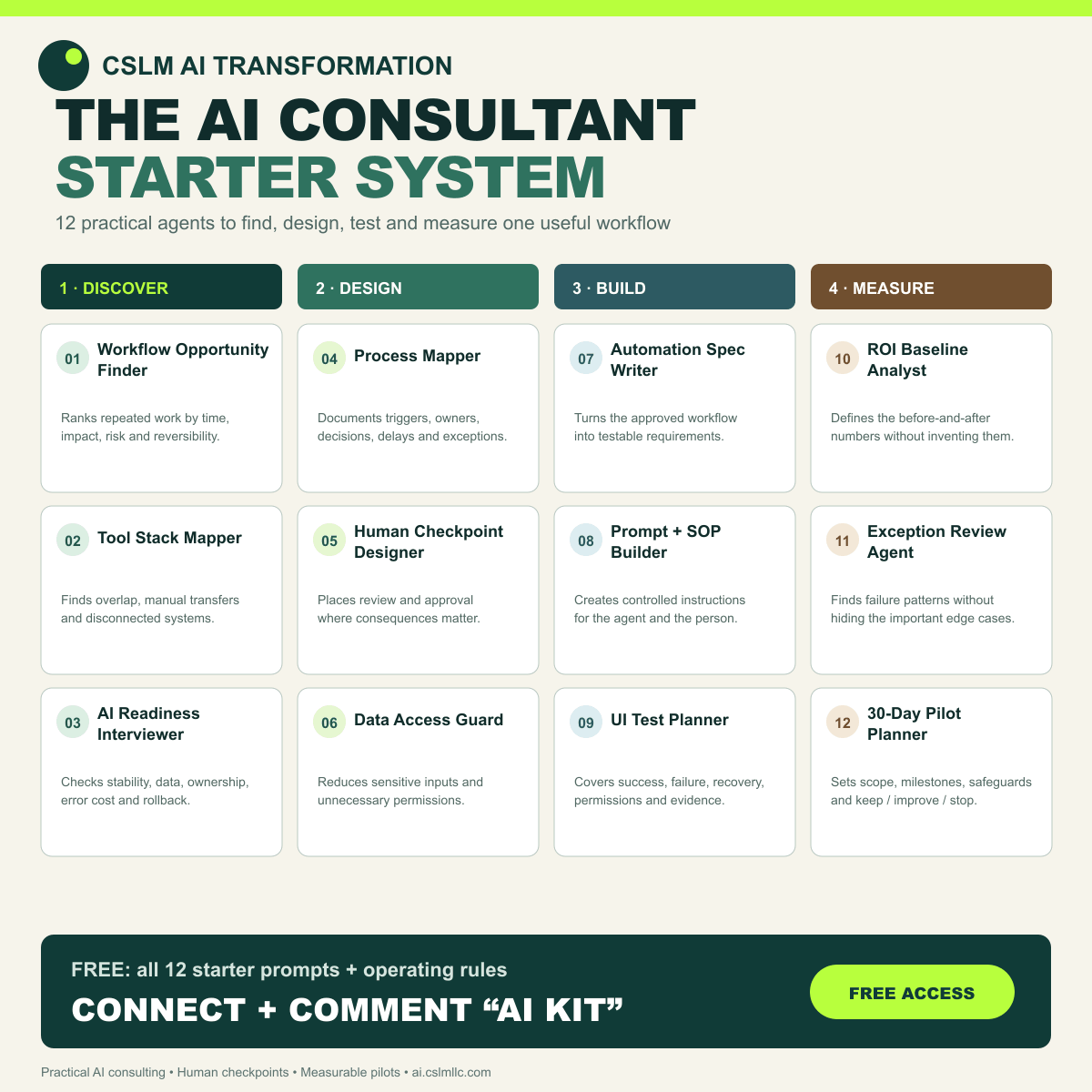
The AI Consultant Starter System.
Twelve reusable prompts for finding, designing, testing, and measuring one practical small-business AI workflow.
Free to use. No email required. These are working prompt templates—not autonomous software, certification, or guaranteed business results.
Control the workflow before building
Specify prompts, operations, and tests
Decide from evidence, not excitement
Use one at a time
A smaller system is easier to trust.
Copy a prompt, replace the words “this workflow” with your real situation, and answer with non-sensitive information. Ask the agent to mark assumptions and cite the source of any factual claim.
Do not paste passwords, payment data, private customer records, health information, or other regulated information into a general AI chat.
01Discover
Workflow Opportunity Finder
Turns recurring frustrations into a ranked shortlist of practical automation candidates.
Open starter prompt +
Act as a workflow opportunity analyst. Interview me about repeated work, delays, re-entry, errors, and handoffs in my business. Ask one question at a time. Produce a shortlist ranked by frequency, time cost, business impact, reversibility, and data sensitivity. Do not recommend a tool until the workflow is clear.
02Discover
Tool Stack Mapper
Shows where systems overlap, disconnect, or require the same information twice.
Open starter prompt +
Map my current software stack. For each tool, capture its purpose, owner, data entered, data produced, integrations, monthly cost, and failure points. Identify duplicate capabilities and manual transfers. Separate confirmed facts from assumptions and ask before filling any gap.
03Discover
AI Readiness Interviewer
Checks whether a proposed workflow is stable, observable, and safe enough for a pilot.
Open starter prompt +
Assess one workflow for AI readiness. Check task stability, input quality, exception rate, privacy, permissions, consequences of error, current baseline, human ownership, and rollback. End with Ready, Needs preparation, or Do not automate yet, and explain the evidence for the rating.
04Design
Process Mapper
Documents the current workflow before anyone redesigns it.
Open starter prompt +
Create an as-is process map from my description. List the trigger, each step, system used, owner, input, output, waiting time, decision, exception, and final result. Mark unknowns clearly. Then propose a smaller to-be pilot that changes only the minimum necessary steps.
05Design
Human Checkpoint Designer
Places approval, escalation, and override points where errors matter most.
Open starter prompt +
Review this proposed AI workflow and design human checkpoints. For every consequential action, specify who reviews it, what evidence they see, approve/edit/reject options, timeout behavior, escalation path, and audit record. Prefer reversible drafts over automatic final actions.
06Design
Data Access Guard
Reduces unnecessary data exposure and excessive system permissions.
Open starter prompt +
Perform a least-privilege review for this workflow. List each data field and system permission requested, why it is needed, whether it can be removed or masked, retention needs, prohibited data, and who may access the result. Flag any credential sharing or unrestricted write access.
07Build
Automation Spec Writer
Converts the approved workflow into a buildable, testable specification.
Open starter prompt +
Write a plain-language automation specification for this workflow. Include trigger, required inputs, validation, deterministic rules, AI steps, integrations, outputs, exception queue, retries, ownership, logging, rollback, and acceptance criteria. Keep assumptions in a separate list for approval.
08Build
Prompt and SOP Builder
Creates a controlled operating prompt and a matching human procedure.
Open starter prompt +
Create an operating prompt and a short SOP for this task. The prompt must define role, allowed sources, required output, uncertainty handling, prohibited actions, and escalation. The SOP must explain how a person starts, reviews, corrects, records, and stops the process.
09Build
UI Test Planner
Builds realistic browser scenarios before an automated workflow touches production.
Open starter prompt +
Design UI test coverage for this workflow. Include the happy path, validation, empty state, duplicate submission, permissions, timeout, partial failure, recovery, accessibility basics, and mobile viewport. For each case provide preconditions, steps, expected result, evidence to capture, and cleanup.
10Measure
ROI Baseline Analyst
Defines the before-and-after numbers needed to decide whether the pilot helped.
Open starter prompt +
Create a measurement baseline for this workflow without inventing numbers. Define volume, handling time, waiting time, error/rework rate, completion rate, operating cost, and customer impact. Provide a simple collection plan and the minimum sample needed before comparing a pilot.
11Measure
Exception Review Agent
Finds patterns in failures without hiding edge cases inside an average.
Open starter prompt +
Analyze this de-identified exception log. Group failures by cause, frequency, business impact, detectability, and recovery effort. Show representative examples, distinguish system defects from bad inputs and policy cases, and recommend what to fix, route to a human, or leave manual.
12Measure
30-Day Pilot Planner
Turns a promising idea into a limited experiment with a clear stop decision.
Open starter prompt +
Plan a 30-day pilot for this workflow. Define scope, owner, users, sample data, safeguards, baseline, weekly milestones, acceptance thresholds, stop conditions, incident response, review cadence, and the final keep/improve/stop decision. Do not assume production access is approved.
Four operating rules
Useful agents stay inside clear boundaries.
- 01Use approved inputs
Start with public, synthetic, or explicitly authorized business information.
- 02Require visible evidence
Keep sources, assumptions, actions, and exceptions reviewable.
- 03Keep consequential actions human
Draft first. Approve before sending, charging, deleting, or changing access.
- 04Measure before expanding
Compare the pilot with a real baseline and keep a stop condition.
Need the version for your business?
Bring one workflow. We will help you choose the right starting agent.
CSLM's free five-day showcase begins with a contained workflow, approved information, and a measurable definition of better.