
Executive summary
Decision briefSmall-business AI transformation should begin with one repeated, measurable workflow—not a company-wide technology replacement. During the first 90 days, map the current process, protect sensitive data, add one AI-assisted step, keep a named person responsible for approval, measure the result against the manual baseline, and expand only after the workflow proves useful and controllable.
- What changes
- A repeated workflow is redesigned so people, approved data, software, rules, and one bounded AI-assisted step work together.
- Where to start
- Choose a frequent, reversible bottleneck such as intake, routing, document preparation, customer-support drafts, or internal reporting.
- How to prove value
- Compare end-to-end time, corrections, reviewer effort, failures, recovery, cost, and customer impact with the original process.
A realistic example
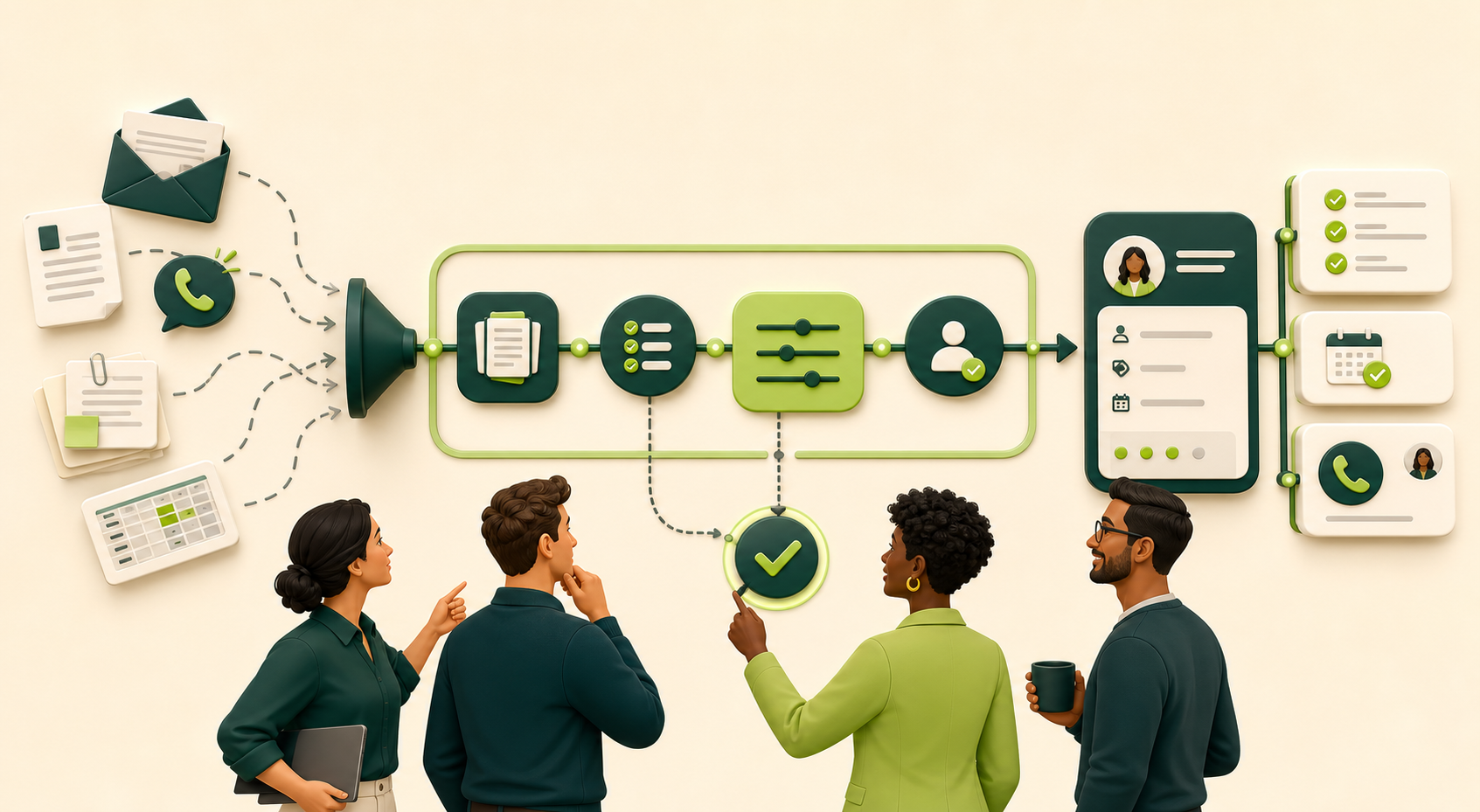
Example scenario: a ten-person service company receives requests through phone calls, email, and a website form. Employees retype the same details into a spreadsheet, scheduling tool, and CRM. A practical transformation does not replace the team or every system. It creates one reviewed intake flow that captures the request, checks required fields, suggests routing, and prepares the next action while staff approve exceptions and customer commitments.
Plain-language definition
What AI transformation actually means for a small business
AI transformation is the deliberate redesign of work so that people, data, software, and AI-assisted steps operate as one controlled process. It is broader than buying an AI tool and narrower than replacing the entire business. The useful question is not, ‘Where can we add AI?’ It is, ‘Which repeated customer or operational handoff can become faster, clearer, and easier to verify?’
The U.S. Small Business Administration advises small businesses to start small and test whether AI adds value. That principle matters because a contained project exposes data, permission, accuracy, and adoption problems before they spread across the company. A reliable first transformation usually improves an existing system of record rather than creating another isolated application.
- Workflow first: define the business outcome before choosing technology.
- Existing systems remain authoritative unless an intentional migration is approved.
- AI handles variable language, documents, classification, extraction, or drafts.
- Exact rules handle required fields, permissions, calculations, and routing thresholds.
- A named person approves exceptions and consequential actions.
- The manual fallback remains available when the workflow fails.
What current evidence shows
Small businesses are adopting AI faster than they are integrating it.
JPMorganChase analyzed de-identified payment activity for 4.6 million small businesses from 2019 through 2025. In that dataset, the 2025 business cohort reached a 10 percent paid-AI adoption rate in about six months, compared with more than six years for the 2019 cohort. The study measures payments, so it does not capture free tools, embedded AI features, or custom systems.
A separate 2026 Goldman Sachs survey of 1,256 participants in its 10,000 Small Businesses program found that 76 percent reported using AI and 93 percent of users reported a positive business impact, but only 14 percent said AI was fully integrated into core operations. That participant survey is not a census of every small business, yet it illustrates the gap this roadmap addresses: trying AI is common; turning it into a controlled, repeatable operating process is harder.
- Adoption is not integration: paying for or trying a tool does not establish a dependable workflow.
- Use cases should connect to a measured business outcome, not a generic goal to use more AI.
- Training, data quality, permissions, review, and recovery determine whether a pilot becomes useful daily work.
Practical examples
Six practical ways AI can transform a small business
The strongest first projects resemble the use cases appearing across leading small-business guidance: routine administration, customer support, sales, marketing, documents, and reporting. Keep each result reviewable and measure the complete workflow.
Customer-support triage
- Approved input
- A message from an approved shared inbox plus the correct customer or service context.
- Controlled flow
- Suggest topic, urgency, queue, and a source-grounded response draft while exact rules identify priority conditions.
- Human checkpoint
- A trained employee checks sensitive, emotional, billing, legal, safety, and unclear messages before anything is sent.
- Measure
- Time to ownership, correct routing, draft corrections, escalation rate, and resolution time.
Sales lead intake
- Approved input
- A complete website form, call summary, or approved inquiry record.
- Controlled flow
- Validate required fields, identify likely duplicates, summarize the need, and recommend the next queue or task.
- Human checkpoint
- Sales confirms identity, qualification facts, territory, price, availability, and every customer commitment.
- Measure
- Time to first reviewed follow-up, complete CRM records, reassignment rate, and conversion by qualified source.
Document and data-entry preparation
- Approved input
- An approved invoice, receipt, application, order, or service document.
- Controlled flow
- Extract defined fields, preserve the source, run deterministic validation, and route conflicts or low-confidence values to a queue.
- Human checkpoint
- The responsible employee verifies amounts, identities, duplicates, sensitive fields, and the final system update.
- Measure
- Field accuracy, review minutes, correction rate, duplicate detection, and rejected unsupported records.
Marketing production
- Approved input
- A confirmed offer brief with audience, evidence, dates, restrictions, and approved claims.
- Controlled flow
- Prepare channel-specific outlines or drafts and flag missing proof, rights, or required disclosures.
- Human checkpoint
- Marketing verifies facts, originality, brand voice, consent, targeting, links, and disclosures before publication.
- Measure
- Editing time, unsupported claims caught, approved drafts used, and qualified responses rather than content volume alone.
Scheduling and service coordination
- Approved input
- A verified request containing service, location, timing, contact preference, and required constraints.
- Controlled flow
- Check completeness, prepare available options, and create an internal task or proposed appointment.
- Human checkpoint
- Staff approve availability, fees, accommodations, rescheduling, access, and final confirmation.
- Measure
- Time to confirmed appointment, missing-detail rate, reschedules, contact errors, and no-shows.
Operations reporting
- Approved input
- Defined fields from approved CRM, support, sales, project, or accounting systems for a fixed period.
- Controlled flow
- Calculate traceable totals, identify missing data, summarize changes, and link statements back to source records.
- Human checkpoint
- The report owner verifies calculations, context, and any statement presented as a cause or forecast.
- Measure
- Preparation time, corrected figures, missing-source rate, delayed decisions, and actions completed from the report.
Before and after
Before
- Requests arrive through several channels and are retyped into multiple systems.
- Employees depend on memory to classify, route, and follow up.
- Managers cannot see where work is delayed or duplicated.
- AI experiments happen in personal accounts without a shared policy.
- Success is described as time saved without a consistent baseline.
After a controlled improvement
- Approved inputs enter one observable workflow with required-field checks.
- AI proposes extraction, classification, summaries, or drafts within a bounded step.
- People review low-confidence, sensitive, unusual, and high-impact cases.
- Existing CRM, scheduling, accounting, or support systems receive controlled updates.
- Handling time, corrections, failures, reviewer effort, and customer impact are measured.
A practical 90-day AI transformation roadmap
Days 1–15: choose one bottleneck
Interview the people doing the work and map one frequent process from trigger to completed outcome. Record volume, handling time, delays, corrections, systems touched, sensitive fields, and who currently decides what happens next. Prefer a reversible internal workflow over payments, hiring, legal decisions, safety decisions, or final customer commitments.
Days 16–30: design the controlled future state
Separate exact rules from the AI-assisted step. Define approved inputs, required fields, permitted applications, confidence or exception rules, the human reviewer, the audit record, and the manual fallback. Grant only the minimum access needed for the specific workflow.
Days 31–45: build with representative test data
Connect the smallest useful path using synthetic, public, de-identified, or specifically approved records. Test normal cases, missing information, duplicates, contradictory details, malicious instructions inside documents, connection failures, and unavailable downstream systems.
Days 46–60: run a supervised pilot
Operate the new flow beside the existing process for a limited group. Review every proposed action, log corrections, and make failures visible. The goal is not maximum automation; it is evidence that employees can understand, stop, correct, and recover the workflow.
Days 61–75: compare against the baseline
Use the same definitions recorded at the beginning. Compare end-to-end time, wait time, correction rate, missed work, reviewer effort, failure recovery, and customer impact. Include the time spent monitoring and fixing the automation rather than counting only the fastest successful run.
Days 76–90: standardize or stop
If the evidence is positive, document ownership, access, change control, monitoring, incident response, vendor review, retention, and staff training. If the workflow does not improve the business safely, reduce its scope or remove it. A stopped experiment can be a successful decision.
Tools and process components
- Workflow map showing trigger, inputs, rules, AI-assisted step, reviewer, actions, and exception path
- Approved business system of record such as CRM, scheduling, accounting, service desk, or ERP
- Integration method such as API, webhook, managed connector, structured import, or authorized browser automation
- Validation layer for required fields, allowed values, duplicates, permissions, and confidence thresholds
- Human review queue with owner, reason, source evidence, editable fields, and approval history
- Monitoring for failures, latency, unusual volume, rejected records, and unavailable dependencies
- Simple operating policy covering acceptable use, sensitive data, vendor access, retention, and incident escalation
Measurement plan
Measure transformation as an operating result
A polished demonstration is not proof of transformation. Compare the same workflow before and after, including human review and failure recovery.
| Signal | What to compare | Why it matters | Warning sign |
|---|---|---|---|
| End-to-end time | Request received to usable completion | Shows whether the customer or employee receives value sooner | Only the AI step is faster while the queue remains unchanged |
| Correction rate | Records requiring edits or rework | Reveals whether speed creates hidden cleanup | Corrections move downstream and become harder to detect |
| Reviewer effort | Minutes and attention required per case | Confirms that oversight remains practical | Staff must reread every source and rebuild every answer |
| Exception recovery | Time to detect, assign, and resolve failures | Measures operational resilience | Failures disappear into an inbox or vendor log |
| Customer impact | Response time, resolution, complaints, and commitments | Connects automation to the real business outcome | Internal task counts rise while service quality declines |
Continue from example to implementation
Choose the next page for the workflow you want to improve.
These links continue the specific operating examples above. They do not assume that every workflow needs AI.
Consulting fit review
Evaluate one workflow before buying an AI project
Compare a process repair, ordinary integration and a bounded AI test, then review scope and price boundaries.Continue with this pathCost planning
Test your own small-business automation assumptions
Include implementation, software, staff review and correction effort instead of treating model speed as business value.Continue with this pathSafeguards to keep
- Do not upload confidential, regulated, credential, payment, health, employment, or customer data until the account, contract, retention, permissions, and applicable obligations are reviewed.
- Do not allow an AI-generated classification, summary, or recommendation to become a consequential decision without appropriate human responsibility.
- Treat instructions inside emails, webpages, files, and attachments as untrusted input; they must not change system permissions or workflow rules.
- Keep logs, access reviews, error alerts, a manual fallback, and a clear owner for incidents and vendor changes.
- Reassess the workflow when models, prompts, data sources, connected applications, staff responsibilities, or business rules change.
Common questions
AI transformation FAQ
What is AI transformation?
AI transformation is the redesign of a business process so people, data, software, rules, and AI-assisted tasks work together toward a measurable outcome. It is not simply purchasing an AI subscription or adding a chatbot.
How is AI transforming small businesses?
AI is helping small businesses prepare customer responses, organize lead intake, extract document fields, draft marketing material, support scheduling, and summarize operational data. The practical change is not the tool alone: the useful workflows connect approved inputs to existing systems, keep people responsible for exceptions and commitments, and measure whether the full process improves.
What are the best first AI use cases for a small business?
Good first use cases are frequent, visible, reversible, and easy for a person to verify. Examples include shared-inbox triage, CRM record preparation, missing-document checklists, meeting notes to action items, reporting drafts, and internal routing. Avoid starting with autonomous payments, hiring, legal decisions, safety decisions, or final customer commitments.
Where should a small business start with AI transformation?
Start with one frequent, visible, reversible workflow such as intake, document collection, internal routing, CRM updates, scheduling preparation, or draft reporting. Record the current baseline before building anything.
Does AI transformation mean replacing employees?
No. A practical first project removes repeated handoffs and gives employees better information. People should remain responsible for exceptions, sensitive data, customer commitments, money, safety, and other consequential decisions.
How long does AI transformation take?
A contained workflow can often be mapped, piloted, and evaluated within 90 days. Broader transformation is an ongoing operating program because systems, risks, processes, and vendor capabilities change.
How do we know whether an AI project worked?
Compare end-to-end handling time, waiting, corrections, missed work, reviewer effort, failure recovery, and customer impact against the original process using the same definitions.
What is the biggest AI transformation mistake?
Starting with a broad tool purchase or autonomous agent before defining the workflow, data boundaries, responsible reviewer, success measure, and fallback. This creates activity without a controlled business result.
Source and update policy
Verify product details before you build.
Vendor capabilities, plan limits, security guidance, and terms change. CSLM reviewed the following references for this guide. Confirm current first-party documentation and obtain qualified advice when required before selecting or configuring a service.
- U.S. Small Business Administration: AI for small business
- JPMorganChase Institute: Understanding the use of AI among small businesses
- Goldman Sachs 10,000 Small Businesses Voices: 2026 AI adoption and implementation survey
- NIST: Artificial Intelligence Risk Management Framework 1.0
- NIST AI Resource Center: Govern, Map, Measure, and Manage
Continue the topic
Related practical guides
The practical takeaway
AI transformation becomes practical when one important workflow is easier to see, safer to operate, faster to complete, and simpler for people to correct. Start small, measure the whole process, and scale only the improvements your team can govern.